Quickstart
This quickstart shows how to trace a script, create a baseline, and detect a performance regression.
1. Create a sample script
Create a file named my_app.py:
import time


def process_data():
    time.sleep(0.10)
    calculate_results()


def calculate_results():
    time.sleep(0.20)


def main():
    for _ in range(2):
        process_data()


if __name__ == "__main__":
    main()
2. Run a trace
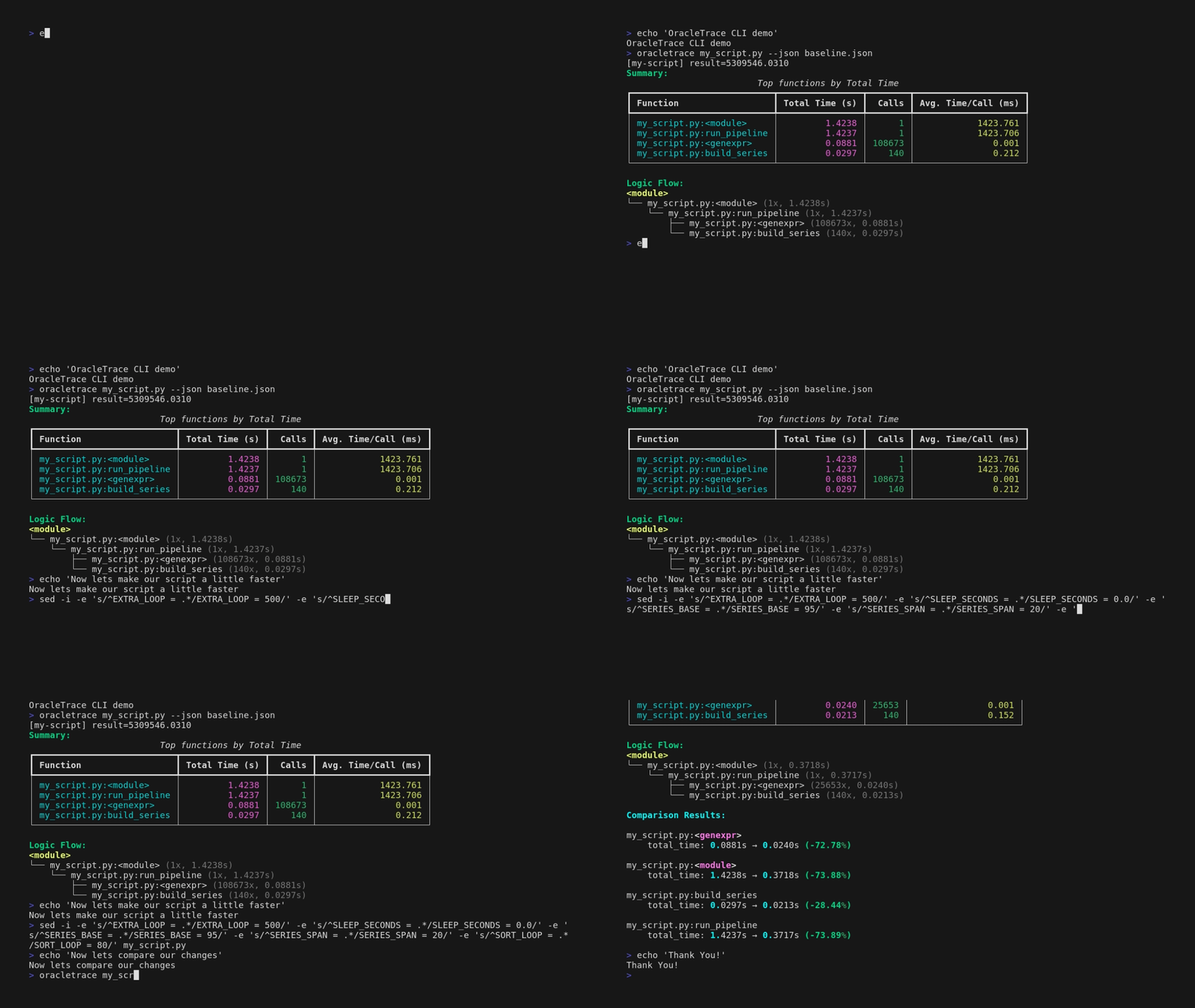
You will see:
- Top functions by total time
- Call counts and average time per call
- Call graph logic flow
3. Save a baseline trace
Keep this file as your reference run.
You can also use the explicit baseline command:
Optional: also export to CSV for spreadsheet-style analysis.
4. Simulate a regression and compare
Increase one of the sleep values in your script, then run:
Or compare saved trace files directly:
Comparison output highlights:
- Functions that got slower
- Functions that got faster
- Newly added or removed functions
5. Understand the output quickly
Example flow:
OracleTrace is optimized for relative change detection between runs, which makes it ideal for everyday checks and CI validation.
6. Add a CI regression gate (optional)
Use the comparison step as a build guard:
oracletrace my_app.py --json current.json
oracletrace baseline compare baseline.json current.json --fail-on-regression --threshold 10
When a function regresses above the configured threshold, OracleTrace returns exit code 2.